Remote and video interviews are now the go-to way for companies to meet potential candidates. Whether it’s a quick screening call on Zoom or a formal interview on Microsoft Teams, how you show up on camera matters just as much as your answers. In fact, small details like poor lighting or bad audio can distract an interviewer and take away from the great things you have to say.
The good news? With a few simple tweaks, you can make your video setup work for you. Think of it as setting the stage so your skills and personality shine through without distractions. Let’s walk through the three essentials: lighting, sound, and etiquette.
Lighting: Let Them See the Real You
Imagine being on a call where the other person’s face is hidden in shadows or looks washed out because of a bright light behind them. It can feel distant and unprofessional. That’s why lighting is the first thing you should get right.
Here’s how to do it:
- Face your light source – Sit facing a window if possible. Natural light makes you look fresh and approachable. If the sun is too strong, use a curtain to soften it.
- Avoid backlighting – Sitting with a window or lamp behind you will cast shadows and make your face hard to see.
- Invest in a simple light – If natural light isn’t an option, a small ring light or desk lamp placed in front of you works wonders.
- Test before the call – Open your camera app and adjust until you look clear and evenly lit.
Think of lighting like a spotlight on stage. You want the focus to be on you—not on shadows or a distracting glare.
Sound: Make Every Word Count
We’ve all been on calls where the other person sounds muffled, too quiet, or like they’re underwater. During an interview, that’s the last impression you want to leave. Clear audio helps your confidence come across and shows you’ve prepared.
Here are some easy ways to improve sound:
- Use headphones or a headset – This reduces background noise and echo. Even the earbuds that come with your phone are often better than a laptop’s built-in mic.
- Pick a quiet spot – Close the door, turn off the TV, and let others in your home know you’ll need quiet time.
- Check your mic – Do a quick test on Zoom, Google Meet, or Teams before the interview starts. Nothing feels worse than realizing your interviewer can’t hear you properly.
- Mute distractions – Silence notifications on your phone and computer. A “ping” in the middle of an answer can throw you off.
Your goal is simple: make sure your answers come through clearly, without your interviewer straining to hear you.
Etiquette: Show Professionalism on Screen
Even though you’re not in a physical office, a video interview deserves the same level of professionalism as an in-person meeting. The way you act, dress, and engage says a lot about you as a candidate.
Here’s what to keep in mind:
- Dress for the role – Wear professional clothes that you’d normally wear to an in-person interview. Solid colors work best on camera.
- Mind your background – A tidy space makes you look organized. If your environment is busy, use a neutral virtual background.
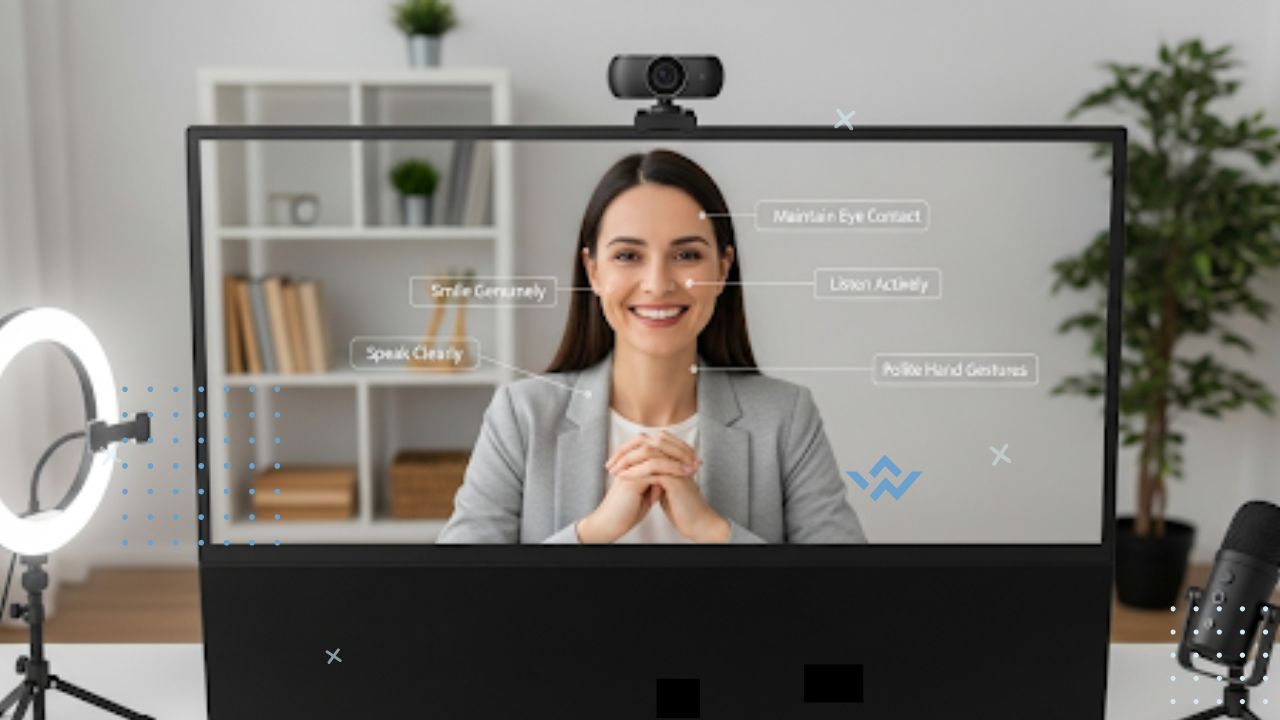
- Look into the camera – It may feel odd, but when you speak, look at the camera instead of your own image. This creates a sense of eye contact.
- Be punctual – Join the call a few minutes early. It shows respect for the interviewer’s time.
- Stay engaged – Smile, nod, and show you’re listening. Little gestures can build rapport even through a screen.
Think of your video interview as your chance to “invite” the interviewer into your space. A calm, professional setup helps them focus on you, not your surroundings.
FAQs
Q1. Should I use a virtual background in a video interview?
A clean, simple background is always best. If your environment is messy or distracting, a neutral virtual background (like a plain wall or office setting) is perfectly fine. Just avoid backgrounds with bright patterns or moving animations.
Q2. What if my internet drops during the interview?
Stay calm and rejoin the call as quickly as possible. If the issue continues, email or message the interviewer right away to explain. Having a backup option, like your phone’s hotspot, can help you reconnect faster.
Q3. Do I really need to dress up if I’m only visible from the waist up?
Yes—dressing fully helps you feel more professional and confident. Plus, you never know when you might need to stand up unexpectedly. Always dress as if you’re going to an in-person interview.
Tech Check: Avoid Last-Minute Stress
Technical glitches can ruin the flow of an interview. The best way to prevent this is to prepare ahead of time:
- Test your internet connection and make sure it’s stable.
- Close unnecessary apps and browser tabs to avoid lag.
- Keep a backup plan, like using your phone’s hotspot, in case of issues.
Doing a five-minute tech check before the interview can save you a lot of stress later.
Final Thoughts
Remote interviews might feel intimidating at first, but with the right setup, you’ll quickly see they’re an opportunity to shine. Good lighting lets your personality show, clear audio ensures your message gets across, and professional etiquette leaves a lasting impression.
Remember: the goal isn’t to have a perfect studio setup—it’s to remove distractions so the interviewer can focus on what really matters: you, your skills, and your potential. With a little preparation, you can walk into your next video interview with confidence.